Usage
Using the DIP switches
On the bottom of the gc-1000-gps board there should be two banks of 16 dip switches total, their pinouts are shown below:
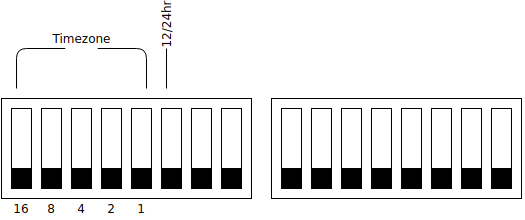
These switches allow the user to set the timezone and other behavior settings.
Set the timezone
Using the first five switches, configure your timezone offset starting from UTC-12, use the chart below
DIP Setting |
Timezone |
|---|---|
00000 |
UTC-12 |
00001 |
UTC-11 |
00010 |
UTC-10 |
00011 |
UTC-9 |
00100 |
UTC-8 |
00101 |
UTC-7 |
00110 |
UTC-6 |
00111 |
UTC-5 |
01000 |
UTC-4 |
01001 |
UTC-3 |
01010 |
UTC-2 |
01100 |
UTC-1 |
01101 |
UTC |
01110 |
UTC+1 |
01111 |
UTC+2 |
10000 |
UTC+3 |
10001 |
UTC+4 |
10010 |
UTC+5 |
10011 |
UTC+6 |
10100 |
UTC+7 |
10101 |
UTC+8 |
10110 |
UTC+9 |
10111 |
UTC+10 |
11000 |
UTC+11 |
11001 |
UTC+12 |
11010 |
NOT IMPLEMENTED |
11011 |
NOT IMPLEMENTED |
11100 |
NOT IMPLEMENTED |
11101 |
NOT IMPLEMENTED |
11110 |
NOT IMPLEMENTED |
11111 |
NOT IMPLEMENTED |
While fractional timezones are currently not settable via dip switches, we welcome users to submit a PR to add aditional timezones to the list, see Contributing.
Set the 12/24 format
Optionally, you can change the clock from 12 to 24 hour mode using pin 6 on the first dip switch. See the diagram above.
The User Header
Introduced in v0.1-lw-90 a 2x7 pin header on the board allows user expandability with several analog and digital pins arranged in this arrangement.
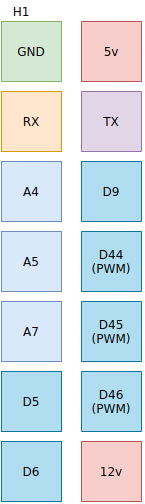
The mega’s serial interface is also broken out onto this user header to allow for even more functionality.
Functions of the lights
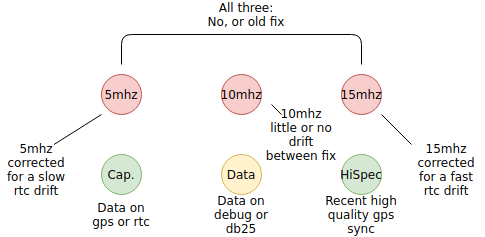
Because gc-1000-gps is also a hardware replacement, some lights have new functions, see diagram below.